Reference-guided editing
How to Write an Image-to-Image Prompt
Image-to-image prompting is a constraint exercise. A clear edit request names the transformation, then protects the identity, shape, framing, or visual details that should survive it.
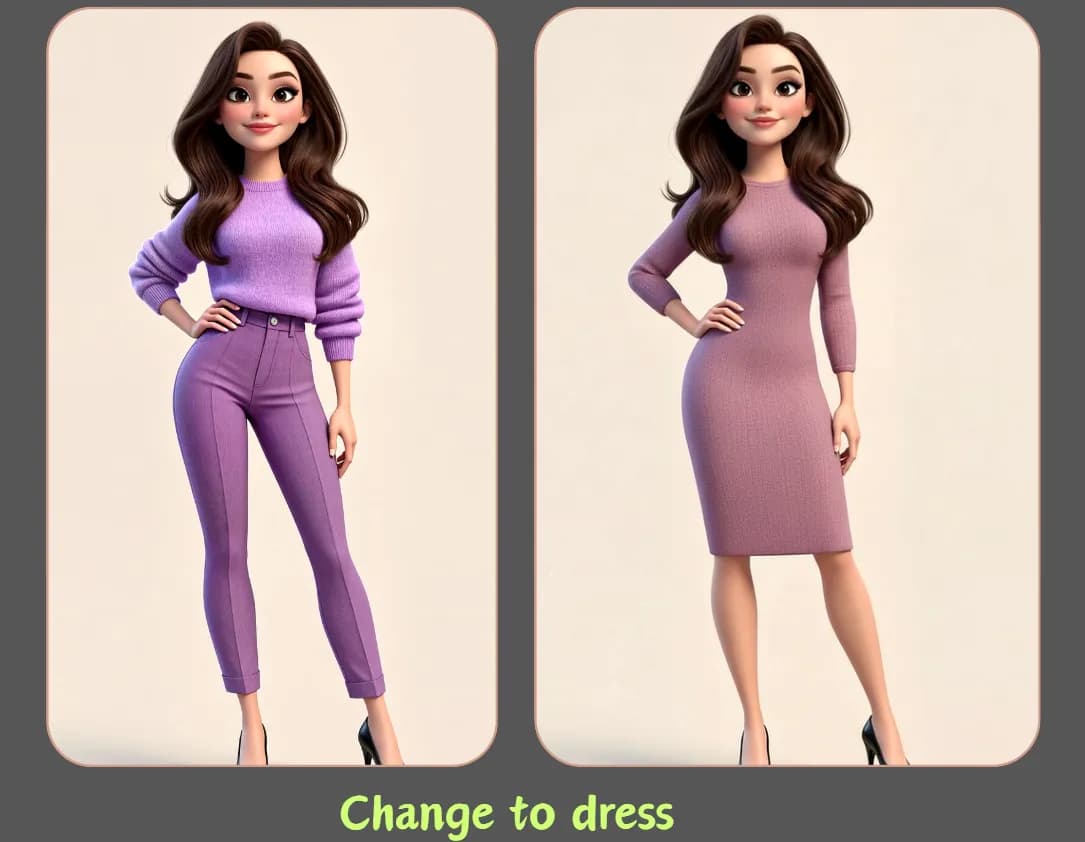
Give the reference image a role
A reference can define the main subject, pose, product silhouette, camera angle, palette, or style. If you upload two references, explain the job of each one. For example, use the first image for the person and composition, and the second only for the target color and material direction.
Do not assume the model knows which details matter most. A person may care about facial identity while a product team cares about package shape and label placement. State those priorities explicitly.
Split the prompt into change and preserve instructions
Begin with the requested edit in one sentence. Follow with a short preservation list. This structure is easier to debug than a paragraph that mixes the old scene, new scene, desired style, and exclusions together.
Change: replace the café with a bright modern gym, neutral equipment, large windows, and natural morning light. Preserve: the same person, facial identity, hairstyle, body proportions, camera angle, and realistic skin texture. Full-body editorial fitness portrait, clean background, no extra people in the foreground.
Review continuity before polish
First compare identity, pose, proportions, perspective, product geometry, and any text that must remain accurate. Only then judge color grading or decorative style. A visually impressive edit is not useful if it changes the wrong person or invents a different product.
No generative model guarantees pixel-perfect preservation. For regulated, contractual, identity-sensitive, or brand-critical work, treat the result as a draft and complete a human review before publishing.
Review checklist
- Use a clear source image with the subject fully visible.
- Keep preservation instructions short and ranked by importance.
- Check faces, hands, logos, labels, and small accessories at full resolution.
- Use only references you have permission to upload and transform.
Apply the method to a real generation
Save the source and prompt, then change one variable per attempt. Before publication, inspect identity, hands, text, logos, and rights-sensitive material at full size.
 Flux 2 Cloud